6.3 The preset boxes: Apertures and Mass
6.3.1 Mass functions
Section titled “6.3.1 Mass functions”| Mass & Apertures Calib Tools Mass Direct Calib Shift Mass Center Mass CallCalib Sample HV offset (V): 0 | Calib Direct Calib adds the line (M, B) to the current [M, B] table. Shift Mass shifts all the [M, B] table according to the ratio (M1/M2) by modifying the Mass in the [B, k(B)] table (Refer to the secondary ion optics guide for information about the [B, k(B)] table). Call Calib opens the Mass calibration routine. |
| Mass & Apertures Calib Tools Mass Set M Aperture init 28Si Sample offset 27.93 Clear Energy Slit X offset Sample HV offset (V): 0 | Tools Aperture init opens the Aperture Init box (See below). Sample offset opens the Sample HV offset box (See below). Clear Energy Slit X offset resets the Energy Slit X to zero for all energy slit presets. |
| Mass & Apertures Calib Tools Mass Set Mass Mass Centering 28Si Clear List of mass 27.9769 Apply | Mass Mass Centering opens the Scan All dialog box. The magnetic field is scanned around the initial value. Clear List of mass removes recently called masses on a scroll down list of Set Mass box. |
| Mass & Apertures Calib Tools Mass Set Mass 28Si Center Mass 27.9769 Apply Sample HV offset (V): 0 | Set Mass edits the required mass, validated by the computer kbd Enter or by clicking Apply. Center Mass button is the same function as Mass Centering. Apply loads the edited mass to the instrument. ▲▼ increments the mass of +/- 1 amu. |
6.3.2 Aperture functions
Section titled “6.3.2 Aperture functions”These presets directly control the instrument. Before starting an analysis, it is advisable to select the presets corresponding to the status of the instrument, since this information is stored in the data files.
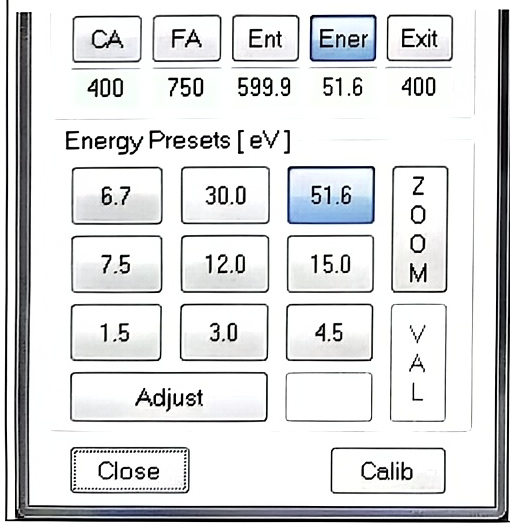
Remark 1: The 3 slits labels cannot be entered since they are determined automatically from the actual aperture position. The Exit Slit label is in MR, the Entrance slit label is in µm and the Energy Slit in eV. If the labels are observed to be wrong, the expert operator must check the slit offset (in the Interface window, select the utility menu “Aperture and Stage”, and there it is possible to select Entrance width offset / Exit width offset / Energy width offset / Energy slit position). These functions must be activated after the operator has set respectively the Entrance width, the Exit width and the Energy width to zero or the low energy edge to axis.
Remark 2: After the motorization chassis is switched off, the aperture positions considered by the instrument and displayed in the user’s interfaces are no more correct. It is necessary to activate Init procedures.