6.5 The "Beam Position" and "Area Position" boxes
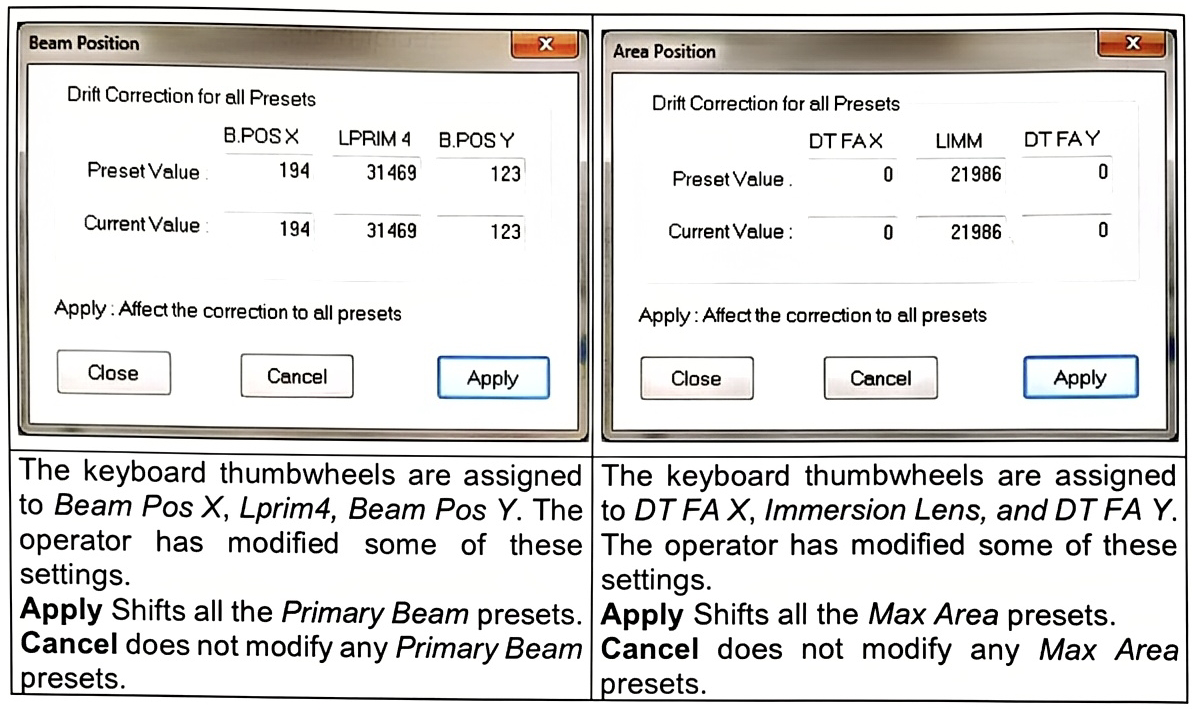
The Beam position box and the Area position box can be selected by clicking the so-labelled buttons in the main Tuning menu bar.
The Beam Pos box must be used whenever the operator wishes to shift all the Primary beam presets of the same value for the 3 parameters Beam Pos X, Beam Pos Y, Last Lens. This is recommended, for example, when it was checked that all the Primary Beam presets were well-centered and that it is required to shift all the presets either for building a new ISF or to compensate some external parasitic effect (e.g. an electrostatic edge effect).
The Area Pos box must be used whenever the operator wishes to shift all the Max Area presets of the same value for the 3 parameters DTR X, DTR Y, Immersion Lens.
-
The keyboard thumbwheels are assigned to Beam Pos X, Lprim4, Beam Pos Y. The operator has modified some of these settings.
- Apply: Shifts all the Primary Beam presets.
- Cancel: does not modify any Primary Beam presets.
-
The keyboard thumbwheels are assigned to DT FA X, Immersion Lens, and DT FA Y. The operator has modified some of these settings.
- Apply: Shifts all the Max Area presets.
- Cancel: does not modify any Max Area presets.